week 3: lost me around 9:30
Ask the lecture you're watching.
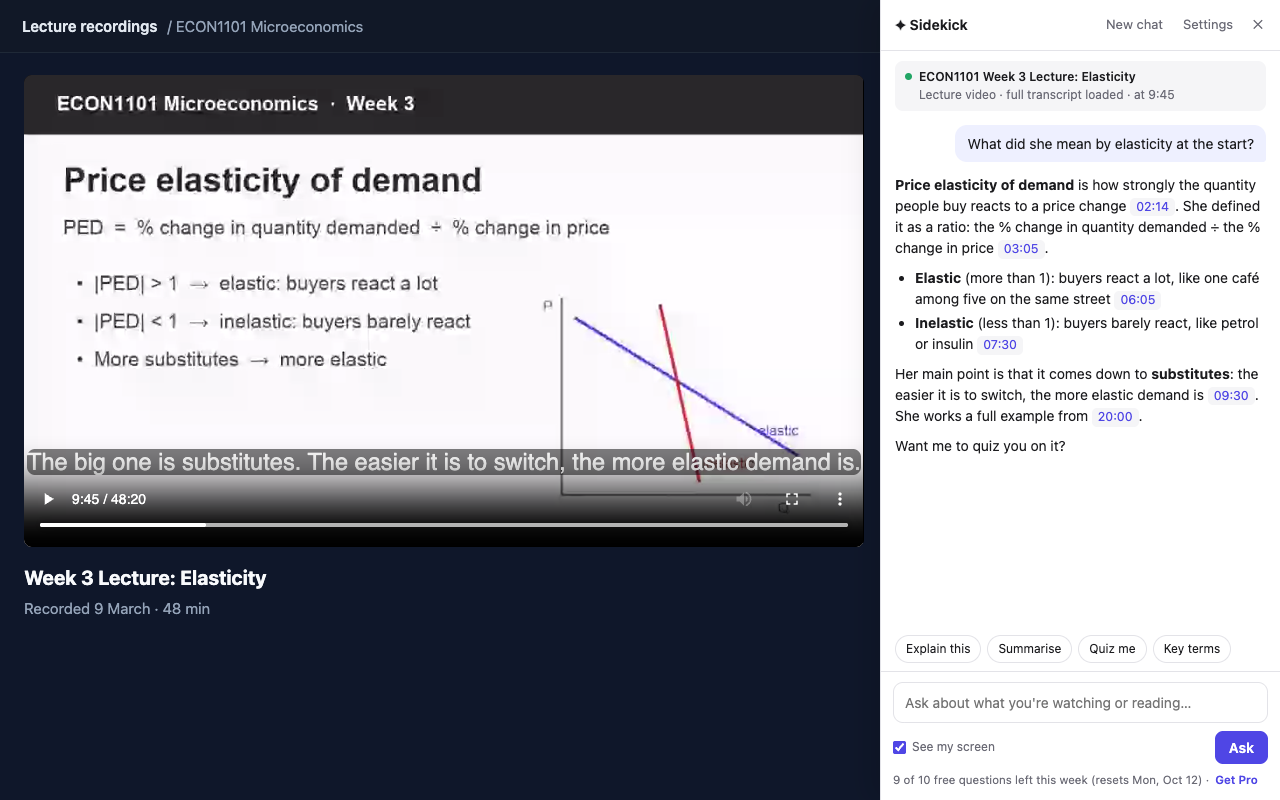
Sidekick is a Chrome extension that reads the transcript of the lecture recording you have open on Echo360, Panopto, Kaltura or YouTube. Ask about the bit you didn't follow and the answer comes back with the minute it's from, like [09:30]. It reads PDFs and Canvas pages too.
What to ask
Whatever you'd ask your lecturer if you could pause them. "Why is the second graph steeper?" "What did she mean by opportunity cost?" Words like this, that slide and what he just said work, because Sidekick reads the page again every time you ask. Open it with Alt+Shift+A.
If you don't know where to start, there are four buttons:
Explain this
Whatever is on screen right now, explained simply, with timestamps back to the lecture.
Summarise
The key points so far, each with a timestamp or page number so you can check it.
Quiz me
One question at a time from the material. Get one wrong and it shows where your reasoning went off before it tells you the answer.
Key terms
The terms from the lecture or reading, each with a one-line definition.
Which lecture players it works with
- Echo360Reads the full transcript, if the recording has one, and knows where you're up to.
- Panopto and KalturaReads the full captions, including the parts you haven't watched yet.
- Canvas Studio and other playersReads the caption file the player loads. If it can't, turn on CC and it picks up the captions as you watch.
- YouTubeThe full transcript, title, description and where you're up to.
- PDFs and Canvas filesShort PDFs whole, diagrams included. Longer ones as text, so turn on "See my screen" for a diagram. Very long PDFs are cut off part-way.
- Canvas pages and online readingsThe page text and anything you highlight.
- Slides and scanned pagesA screenshot of the tab, when "See my screen" is on.
If a recording has no captions at all, Sidekick can only see the frame on screen. Try it on one of your own recordings before you pay for anything.
Quizzes and assessments
On graded quiz pages in Canvas, Moodle, Blackboard and Brightspace, Sidekick won't tell you which answer is right. It explains the idea behind the question and points to where your lecture covered it.
Rules on AI differ between universities and between units, so check yours before using any AI tool on assessed work. Exam lockdown browsers switch extensions off.
Pricing
Free
$0
- 10 questions a week
- Every player and page listed above
- No account needed
Pro
US$59 a year, or US$7.99 a month
- 300 questions a month
- Your first 120 each month use Claude Sonnet 5.5, Anthropic's stronger model. The rest use Claude Haiku 4.5, the same as Free
- Cancel any time from your receipt email, and get a full refund within 14 days of a payment
Prices are in US dollars and include GST or VAT where it applies. Not happy? Email within 14 days of a payment for a full refund, no questions asked. A question about a big document counts once per 1.5 MB, rounded up.
Questions
Does it work with my uni's lecture recordings?
If your uni uses Echo360, Panopto, Kaltura or Canvas Studio, it should. Sidekick reads the whole transcript from Echo360 (when the recording has one), Panopto and Kaltura. Other players give it the caption file, or the captions as you watch with CC on. A recording with no captions only gives it the current frame. The free plan is the easiest way to check.
Is it allowed at my uni?
That depends on your university and your unit, so check the rules before using any AI tool for assessed work. On graded quiz pages Sidekick only gives hints, and exam lockdown browsers turn extensions off.
What happens to my lectures and questions?
Nothing leaves your browser until you ask a question, and Sidekick asks your permission before the first one. When you ask, what's open in the tab and your question go to our server and to Anthropic, whose Claude models write the answer. We don't store your pages, questions or answers. The privacy policy has the details.
Which AI model does it use?
Claude, made by Anthropic. Free uses Claude Haiku 4.5. Pro uses Claude Sonnet 5.5 for your first 120 questions each month, then Haiku 4.5. If Sonnet declines a request, another Claude model may answer it.
Which browsers does it run in?
Chrome, Edge, Brave and Arc on a laptop or desktop. Phones and tablets can't run Chrome extensions.
Can I use my own API key?
Yes. In Settings, open Advanced and paste an Anthropic API key. Sidekick's limits then don't apply, and Anthropic bills you directly.
How do I cancel Pro, or get a refund?
Use the link in your receipt email to cancel. Pro keeps working until the end of the period you've paid for. For a refund, email us within 14 days of a payment and you'll get it back in full, no questions asked.